 8dfb0e8154
If the extension ID is set, an alternate title and subtitle are used
for the Connect Request screen. The title is always `External
Extension`, and the subtitle is `Extension ID: [id]` instead of the
origin (which would just be `[extension-scheme]://[id]` anyway).

The hostname for the site is used as a fallback in case it has no
title.

The artificial hostname set for internal connections has been renamed
from 'MetaMask' to 'metamask' because URL objects automatically
normalize hostnames to be all lower-case, and it was more convenient to
use a URL object so that the parameter would be the same type as used
for an untrusted connection.
MetaMask Browser Extension


You can find the latest version of MetaMask on our official website. For help using MetaMask, visit our User Support Site.
MetaMask supports Firefox, Google Chrome, and Chromium-based browsers. We recommend using the latest available browser version.
For up to the minute news, follow our Twitter or Medium pages.
To learn how to develop MetaMask-compatible applications, visit our Developer Docs.
To learn how to contribute to the MetaMask project itself, visit our Internal Docs.
Building locally
- Install Node.js version 10
- If you are using nvm (recommended) running
nvm usewill automatically choose the right node version for you.
- If you are using nvm (recommended) running
- Install Yarn
- Install dependencies:
yarn - Build the project to the
./dist/folder withyarn dist. - Optionally, to start a development build (e.g. with logging and file watching) run
yarn startinstead.- To start the React DevTools and Redux DevTools Extension
alongside the app, use
yarn start:dev.- React DevTools will open in a separate window; no browser extension is required
- Redux DevTools will need to be installed as a browser extension. Open the Redux Remote Devtools to access Redux state logs. This can be done by either right clicking within the web browser to bring up the context menu, expanding the Redux DevTools panel and clicking Open Remote DevTools OR clicking the Redux DevTools extension icon and clicking Open Remote DevTools.
- You will also need to check the "Use custom (local) server" checkbox in the Remote DevTools Settings, using the default server configuration (host
localhost, port8000, secure connection checkbox unchecked)
- You will also need to check the "Use custom (local) server" checkbox in the Remote DevTools Settings, using the default server configuration (host
- To start the React DevTools and Redux DevTools Extension
alongside the app, use
Uncompressed builds can be found in /dist, compressed builds can be found in /builds once they're built.
Contributing
You can read our internal docs here.
You can re-generate the docs locally by running yarn doc, and contributors can update the hosted docs by running yarn publish-docs.
Running Tests
Run tests with yarn test.
You can also test with a continuously watching process, via yarn watch.
You can run the linter by itself with yarn lint.
Architecture
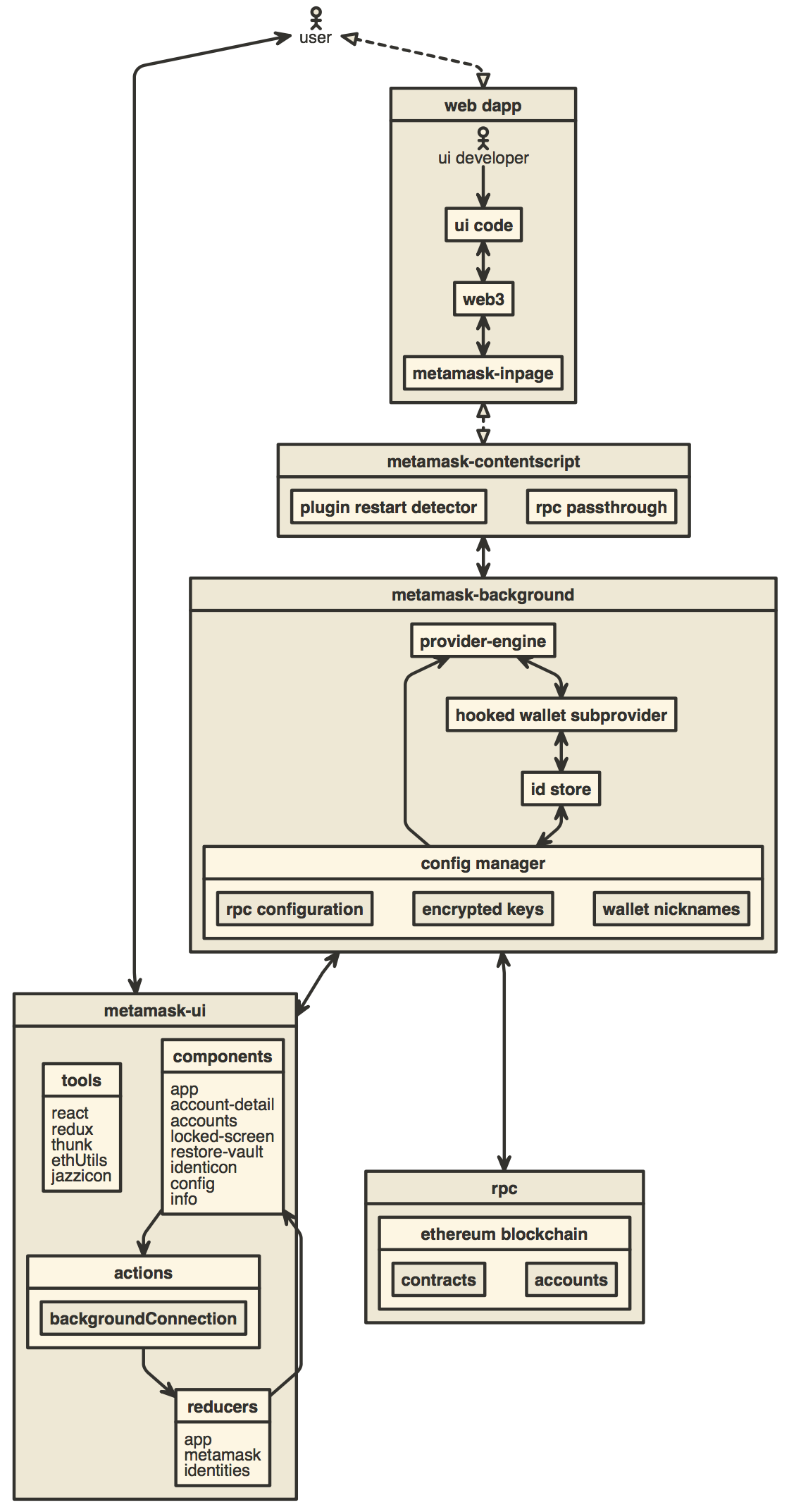
Development
yarn
yarn start
Build for Publishing
yarn dist
Writing Browser Tests
To write tests that will be run in the browser using QUnit, add your test files to test/integration/lib.
Other Docs
- How to add custom build to Chrome
- How to add custom build to Firefox
- How to add a new translation to MetaMask
- Publishing Guide
- The MetaMask Team
- How to live reload on local dependency changes
- How to add new networks to the Provider Menu
- How to port MetaMask to a new platform
- How to use the TREZOR emulator
- How to generate a visualization of this repository's development